

Ergonomic Mistakes That Cause Neck Pain
Neck pain is a common complaint for people who spend long hours at desks, on phones, or working out without proper form. Ergonomic Mistakes That Cause Neck Pain show up in simple habits—like slouching or looking down at your phone—all day. This guide breaks down the most common errors and gives simple, practical fixes you can apply today.

Why posture and setup matter
Small, repeated actions add up. Sitting with your head forward for hours or reaching for a poorly placed mouse causes muscle overload. Over weeks and months this can become chronic pain. Fixing workstation ergonomics is often the fastest way to reduce discomfort.
Top ergonomic mistakes that cause neck pain
Below are the most common culprits people overlook. Each one includes quick fixes you can try right away.
1. Screen too low or too high
If your monitor isn’t at eye level you will tilt your head constantly. This is one of the most frequent ergonomic mistakes that cause neck pain. Even a 15-degree tilt held for hours strains the neck muscles.
- Fix: Set the top of the monitor at or slightly below eye level. Use a monitor riser or a stack of books.
- Tip: Sit back from the screen about an arm’s length for most laptops and monitors.
2. Forward head posture (text neck)
Bending your neck to look at your phone or tablet — often called “text neck” — puts extra load on the cervical spine. Over time, this leads to stiffness, headaches, and pain.
- Fix: Raise your device to eye level. Use a stand for long reading sessions.
- Quick habit: Every 20–30 minutes, look up and do a slow chin tuck (gently draw chin toward neck) to reset your alignment.
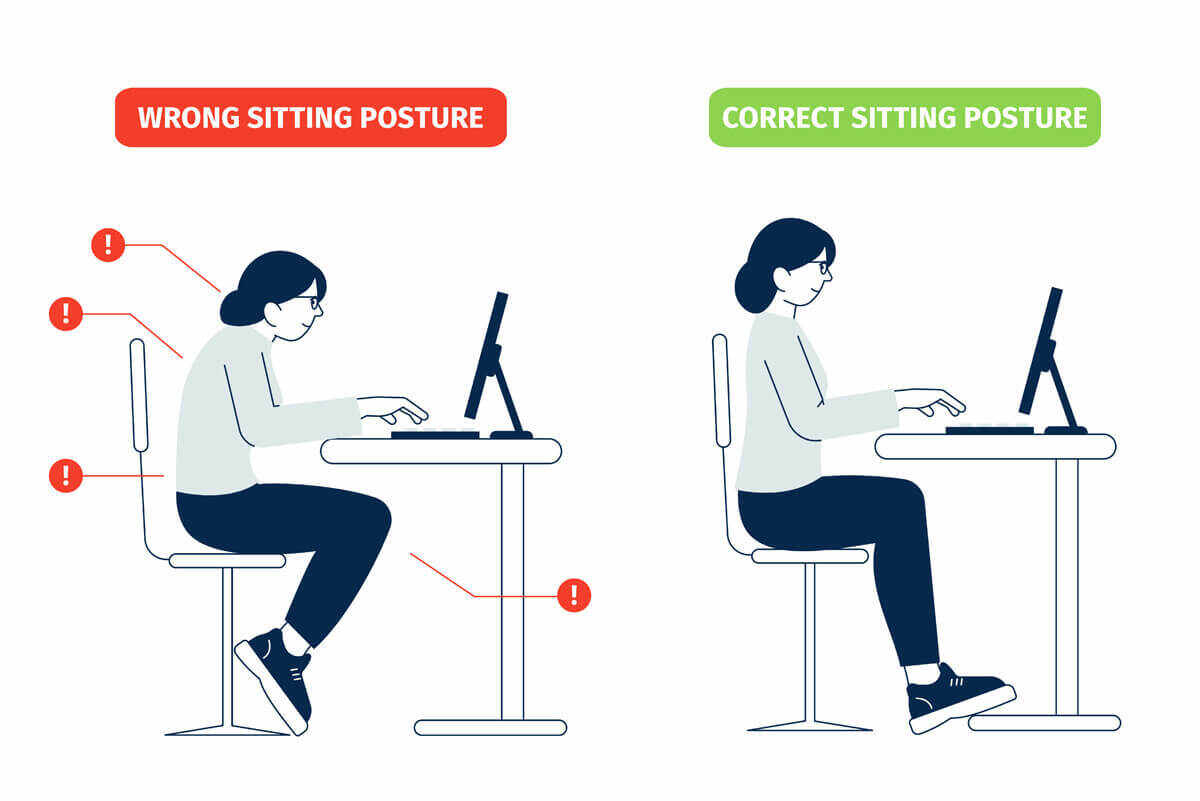
3. Poor chair height and lack of lumbar support
A chair that’s too low or too high forces your neck and shoulders to compensate. If your lower back is unsupported, you tend to slouch, which cascades up into the neck.
- Fix: Adjust chair so feet are flat and knees at about 90 degrees. Add lumbar support if needed.
- Resource: Learn basic workstation setup tips at this helpful guide about common ergonomic mistakes during long work hours.
4. Reaching too far for tools or keyboard
Constantly reaching forward strains the shoulders and neck. If your keyboard and mouse sit too far from you, your shoulders round forward and neck muscles tighten.
- Fix: Keep keyboard and mouse close so elbows rest near your sides. Consider a compact keyboard layout.
- Read more: For home typing ergonomics and tips, check this practical advice on ergonomic typing at home.
5. One-sided phone use and cradling
Holding a phone between your ear and shoulder creates a strong, uneven pull on the neck. Even short calls add up during the day.
- Fix: Use earbuds, speakerphone, or a headset for longer calls.
- Trick: Alternate sides and stretch the neck gently after calls longer than five minutes.
Exercise and form mistakes that aggravate neck pain
Working out can either relieve or worsen neck pain depending on technique. Mistakes during exercise are common contributors to neck issues.

Common workout mistakes
- Neck-craning during core work: Lifting your head too high during crunches strains the neck. Keep a neutral neck and use your hands lightly to support the head.
- Poor form on rows or presses: Overreaching, shrugging shoulders, or clenching the neck during lifts transfers load to the neck.
- Heavy breathing pattern: Holding breath or tensing neck during exertion causes unnecessary neck tightness.
For guidance on safe workout practices to avoid post-exercise neck pain, see a focused article on common exercise mistakes and how to avoid them.
Workspace ergonomics checklist (quick wins)
Make these small changes today to see a fast improvement.
- Monitor: Top of screen at eye level, 1 arm’s length away.
- Chair: Feet flat, knees at 90°, lumbar support.
- Keyboard and mouse: Close to the body; wrists neutral.
- Phone: Use hands-free options or a headset.
- Breaks: Micro-breaks every 20–30 minutes for 30–60 seconds.
Quick stretches and mobility hacks
Short, frequent breaks beat long sessions of immobility. Try these simple moves at your desk.
- Chin tucks: Sit tall and gently draw your chin back. Hold 5–10 seconds. Repeat 6–8 times.
- Neck side stretches: Tilt head toward one shoulder, hold 15–20 seconds, switch sides.
- Upper trapezius release: Reach one hand behind your back and tilt the head away for a deeper stretch.
- Shoulder rolls: Slow forward and backward rolls to relieve shoulder tension.
Ergonomic accessories worth investing in
Small tools can make a big difference in comfort and posture.
- Adjustable monitor arm or riser
- Ergonomic chair with good lumbar support
- External keyboard and vertical mouse
- Phone stand or headset for long calls
- Footrest if feet don’t sit flat
Furniture tips from experts
Choosing the right desk and chair setup prevents common aches. If you sit all day, consider ergonomic furniture recommendations and avoid setups that force you into awkward angles. Read more on common mistakes during long work hours for ideas on desk and chair selection.
Sleep and pillow mistakes that trigger neck pain
How you sleep influences recovery. Using the wrong pillow or sleeping position can undo daytime ergonomics.

- Too high or too flat pillow: Your neck should be in line with your spine. Use a pillow that supports the natural curve.
- Stomach sleeping: This often forces your head to the side and strains the neck. Try to sleep on your back or side with proper support.
- Old pillows: Replace pillows every 1–2 years if they no longer support your head.
When ergonomic fixes aren’t enough
Most neck pain responds to posture changes, movement, and simple ergonomic fixes. However, if you have severe pain, numbness, or weakness, see a healthcare professional. Some problems need targeted therapy.
If pain persists, consider seeing a spine or neck specialist to rule out structural issues. Preventive tips from spine care services can help you identify when to escalate care.
Work-from-home blunders and easy fixes
Working remotely often means improvised setups that create hidden problems. A laptop on the couch, or a kitchen table without support, creates repeated strain.
- Fix: Create a dedicated workspace with proper height and lighting.
- Tip: Use a laptop stand, external keyboard, and mouse for better posture.
- Read: Many home-typing mistakes and setups lead to neck pain — this guide on ergonomic typing at home explains common bad habits and how to correct them.
Practical daily routine to reduce neck pain
Try this simple daily routine for better neck health:
- Morning: Gentle neck mobility and chin tucks (5 minutes).
- Workday: Micro-break every 20–30 minutes; do a quick stretch or stand.
- Evening: Light stretching and avoid screens at least 30 minutes before bed.
Common myths about neck pain
Myth: Rest until it feels better.
Truth: Too much rest can stiffen joints. Gentle movement and posture changes usually help more quickly.
Myth: Neck pain is always serious.
Truth: Most cases are muscular or postural and respond to simple fixes. Still, get checked if there’s numbness, tingling, or severe pain.
How to set up an ergonomic plan that sticks
Changing habits takes small, consistent steps. Choose 1–2 fixes from this post and commit to them for a week. Add more as you see improvements.
Pro tip: Use reminders on your phone or a computer timer to perform micro-breaks and stretches.
Further reading and expert resources
These resources provide more depth on workplace ergonomics and injury prevention:
- Common ergonomic mistakes during long work hours — tips on how reclined posture and poorly fitted desks add to neck and back strain.
- Ergonomic typing at home — practical typing setup and hand/wrist positioning advice for remote workers.
- Five common workplace ergonomic mistakes — workplace-focused fixes for lower back, shoulders, and neck pain.
- Ergonomics and retina — notes how visual strain and poor positioning can lead to neck pain in specialized clinical settings.
- Neck pain prevention — clinical tips for spine health and avoiding pillow-related causes of neck pain.
Video: Simple desk stretches for neck and shoulders
Watch this quick video for guided stretches you can do at your desk:
Tracking progress
Keep a simple log for two weeks noting pain levels, posture changes, and what you adjusted. Small wins — less stiffness, fewer headaches — show you the plan works.
Final checklist before you finish reading
- Monitor height set? ✅
- Keyboard and mouse within reach? ✅
- Phone habit changed (headset/stand)? ✅
- Daily micro-breaks and stretches scheduled? ✅
Ergonomic Mistakes That Cause Neck Pain are often easy to fix with a little attention and consistent action. Make one change today and build from there — your neck will thank you.
If pain is severe, persistent, or accompanied by numbness or weakness, consult a medical professional.
FAQ
What is the fastest way to relieve neck pain from bad posture?
Start with posture correction: raise your screen to eye level, perform chin tucks, and take frequent micro-breaks. Gentle stretching and heat can also help. If pain persists beyond a week or worsens, see a clinician.
Can pillows cause chronic neck pain?
Yes. A pillow that’s too high or too flat alters spinal alignment during sleep. Choose one that supports the natural curve of your neck and replace pillows regularly.
Are standing desks better for neck pain?
Standing desks help but aren’t a cure-all. They must be set up correctly with monitor and keyboard at the right heights. Alternate sitting and standing and maintain good posture in both positions.
When should I see a specialist for neck pain?
If you have severe pain, numbness, tingling, or weakness, or if conservative changes don’t help after a few weeks, consult a healthcare professional such as a physical therapist or spine specialist.
Ready to fix the small things that cause big pain? Try one change from this guide today. Explore more practical guides and ergonomics tips at zenpulsehub.com.